 OpenTemplOpen the editor
A layered papercut poster prompt for ChatGPT
Updated November 2026
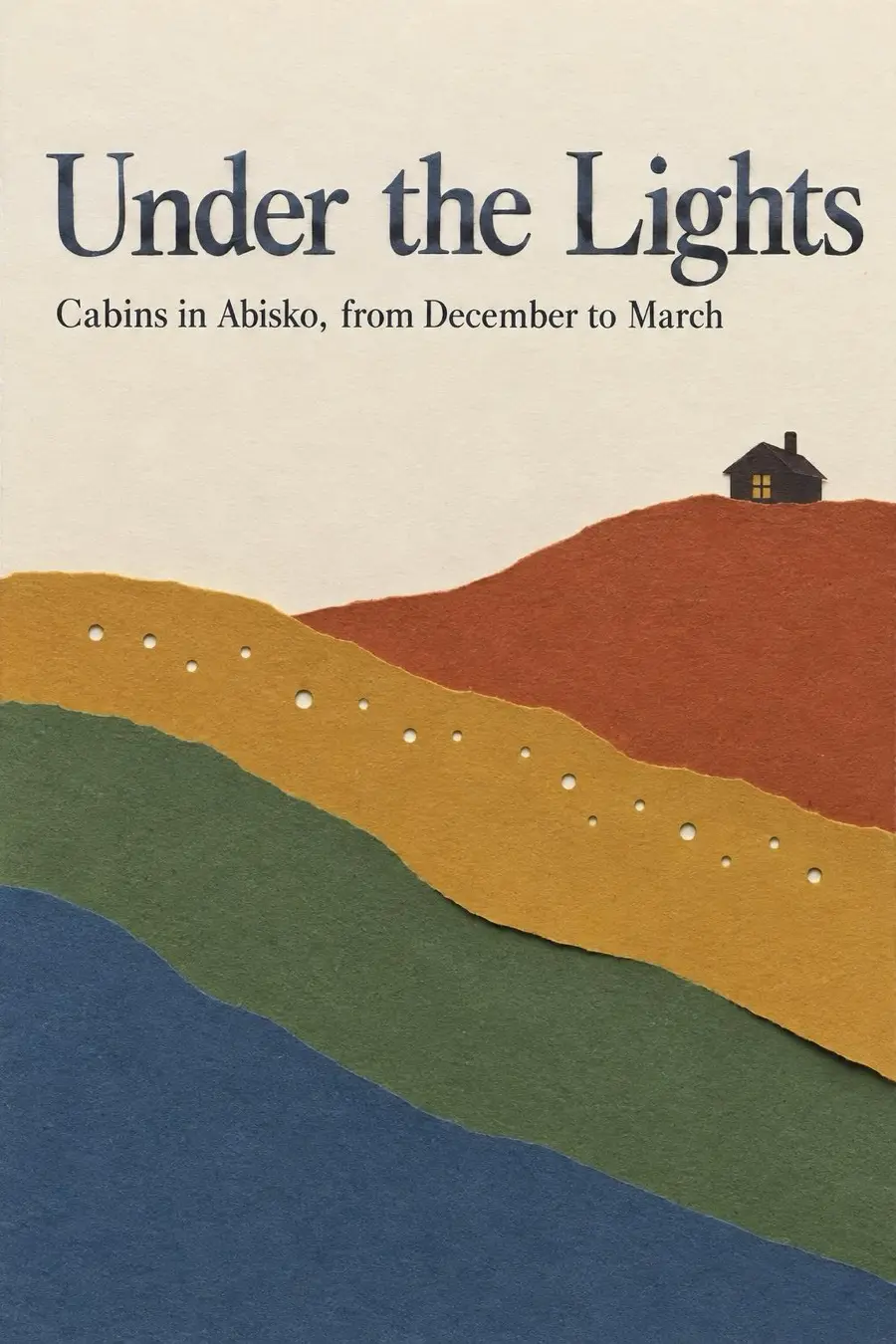
What this style is
Real cut paper: five layers of coloured card cut with a craft knife, visible blade edges and small shadows between layers, bold simple shapes.
What makes it look like this
- dozens of stacked paper layers
- soft inner shadows
- glowing valley
- tiny scene at the end of the wave
- pale empty ground for text
Colours
#E9E6EC#4A5A7A#7A5A72#2B3248#D8A98A
Cool grey blue and dusty mauve layers with one warm sliver of light. For a brand, make the layers tints and shades of the brand colour, and keep the warm light low.
The prompt
Paste this into ChatGPT with image creation on. Change the subject and the three lines of words for your own, and check the spelling before you send it.
Create a finished graphic design: a poster in A3 portrait (1:1.41) format. It is for: Winter cabin stays under the northern lights.
It must look designed and made by hand by a skilled human designer and illustrator, in the style described below. Treat the style as a strict art direction.

STYLE: Layered Papercut
Real cut paper: five layers of coloured card cut with a craft knife, visible blade edges and small shadows between layers, bold simple shapes.
Signature moves to keep:
- dozens of stacked paper layers
- soft inner shadows
- glowing valley
- tiny scene at the end of the wave
- pale empty ground for text

SUBJECT
Show Winter cabin stays under the northern lights in this style. Make the subject the hero and fit everything to it: props, setting and details should belong to this subject, not to the example the style came from.

COMPOSITION
A large curving wave of layers sweeps from the top left diagonally to a small figure or building at the bottom right. A pale near empty ground gives the title space in the top right and body text at the bottom.

TYPOGRAPHY
Light elegant serif headline in black or deep blue sitting on the pale ground, small tidy sans captions beneath, justified paragraph at the bottom left.
Render exactly these words, spelled exactly as written, and no other text anywhere:
- headline: "Under the Lights"
- second line: "Cabins in Abisko, from December to March"
- small details: "Book at nordlys.example"
Give them a clear hierarchy: the headline large and dominant, the rest much smaller.

COLOUR
Palette: #E9E6EC, #4A5A7A, #7A5A72, #2B3248, #D8A98A. Cool grey blue and dusty mauve layers with one warm sliver of light. For a brand, make the layers tints and shades of the brand colour, and keep the warm light low.

TEXTURE AND FINISH
Soft shadows between layers, subtle fibres, a little glow inside the valley.

AVOID
- photo realistic mountain scenery
- soft painted gradients
- symmetrical centred valley
- vector flat shapes
- digital blur
- lens flare
- plastic sheen
- gibberish text
- anything that looks AI generated: plastic sheen, airbrushed skin, overly smooth gradients, glow and lens flare, HDR, stock photo smiles
- gibberish letters, made up words or any text other than the exact words given
- watermarks, signatures, UI elements, borders or frames around the design
- filler decoration: sparkles, floating dots and stars, confetti, random geometric shapes, gradient orbs, ornamental dividers
- uniform line weight, plastic or airbrushed shading, soft storybook gloss, perfect symmetry, melted or merging details, impossible objects
- showing the design as a mockup (a poster on a wall, a phone, a hand holding it): the artwork itself must fill the whole canvas edge to edge, flat and straight on

Do not search the web or look anything up: work only from this brief, so nothing from elsewhere leaks into the design.
Make the image now, in A3 portrait (1:1.41) format, without asking questions first.
(Brief written with OpenTempl, the free, open source design app at opentempl.org. The designer brings the picture back there to set and edit the words.)
How to use it
- Open ChatGPT and check that image creation is available on your account.
- Paste the prompt. Replace the subject line and the words in quotes.
- Send it. If something is off, ask for one change at a time.
- Check every word on the poster. A typo in your prompt is copied into the picture.
Three versions for common jobs
The same prompt, set for a gig poster, an Instagram post and a menu. The words are examples; replace them.
Gig poster
Create a finished graphic design: a poster in A3 portrait (1:1.41) format. It is for: a live music night with three bands at a small venue.
It must look designed and made by hand by a skilled human designer and illustrator, in the style described below. Treat the style as a strict art direction.

STYLE: Layered Papercut
Real cut paper: five layers of coloured card cut with a craft knife, visible blade edges and small shadows between layers, bold simple shapes.
Signature moves to keep:
- dozens of stacked paper layers
- soft inner shadows
- glowing valley
- tiny scene at the end of the wave
- pale empty ground for text

SUBJECT
Show a live music night with three bands at a small venue in this style. Make the subject the hero and fit everything to it: props, setting and details should belong to this subject, not to the example the style came from.

COMPOSITION
A large curving wave of layers sweeps from the top left diagonally to a small figure or building at the bottom right. A pale near empty ground gives the title space in the top right and body text at the bottom.

TYPOGRAPHY
Light elegant serif headline in black or deep blue sitting on the pale ground, small tidy sans captions beneath, justified paragraph at the bottom left.
Render exactly these words, spelled exactly as written, and no other text anywhere:
- headline: "Three Bands, One Night"
- second line: "Doors 20:00, entry 100 kr"
- small details: "Fri 14 Nov, Kolingsborg, Stockholm"
Give them a clear hierarchy: the headline large and dominant, the rest much smaller.

COLOUR
Palette: #E9E6EC, #4A5A7A, #7A5A72, #2B3248, #D8A98A. Cool grey blue and dusty mauve layers with one warm sliver of light. For a brand, make the layers tints and shades of the brand colour, and keep the warm light low.

TEXTURE AND FINISH
Soft shadows between layers, subtle fibres, a little glow inside the valley.

AVOID
- photo realistic mountain scenery
- soft painted gradients
- symmetrical centred valley
- vector flat shapes
- digital blur
- lens flare
- plastic sheen
- gibberish text
- anything that looks AI generated: plastic sheen, airbrushed skin, overly smooth gradients, glow and lens flare, HDR, stock photo smiles
- gibberish letters, made up words or any text other than the exact words given
- watermarks, signatures, UI elements, borders or frames around the design
- filler decoration: sparkles, floating dots and stars, confetti, random geometric shapes, gradient orbs, ornamental dividers
- uniform line weight, plastic or airbrushed shading, soft storybook gloss, perfect symmetry, melted or merging details, impossible objects
- showing the design as a mockup (a poster on a wall, a phone, a hand holding it): the artwork itself must fill the whole canvas edge to edge, flat and straight on

Do not search the web or look anything up: work only from this brief, so nothing from elsewhere leaks into the design.
Make the image now, in A3 portrait (1:1.41) format, without asking questions first.
(Brief written with OpenTempl, the free, open source design app at opentempl.org. The designer brings the picture back there to set and edit the words.)
Instagram post
Create a finished graphic design: a instagram post in 4:5 portrait format. It is for: an announcement post for a new product launch from a small shop.
It must look designed and made by hand by a skilled human designer and illustrator, in the style described below. Treat the style as a strict art direction.

STYLE: Layered Papercut
Real cut paper: five layers of coloured card cut with a craft knife, visible blade edges and small shadows between layers, bold simple shapes.
Signature moves to keep:
- dozens of stacked paper layers
- soft inner shadows
- glowing valley
- tiny scene at the end of the wave
- pale empty ground for text

SUBJECT
Show an announcement post for a new product launch from a small shop in this style. Make the subject the hero and fit everything to it: props, setting and details should belong to this subject, not to the example the style came from.

COMPOSITION
A large curving wave of layers sweeps from the top left diagonally to a small figure or building at the bottom right. A pale near empty ground gives the title space in the top right and body text at the bottom.

TYPOGRAPHY
Light elegant serif headline in black or deep blue sitting on the pale ground, small tidy sans captions beneath, justified paragraph at the bottom left.
Render exactly these words, spelled exactly as written, and no other text anywhere:
- headline: "Now In Store"
- second line: "The autumn collection is here"
- small details: "Open daily 10 to 18"
Give them a clear hierarchy: the headline large and dominant, the rest much smaller.

COLOUR
Palette: #E9E6EC, #4A5A7A, #7A5A72, #2B3248, #D8A98A. Cool grey blue and dusty mauve layers with one warm sliver of light. For a brand, make the layers tints and shades of the brand colour, and keep the warm light low.

TEXTURE AND FINISH
Soft shadows between layers, subtle fibres, a little glow inside the valley.

AVOID
- photo realistic mountain scenery
- soft painted gradients
- symmetrical centred valley
- vector flat shapes
- digital blur
- lens flare
- plastic sheen
- gibberish text
- anything that looks AI generated: plastic sheen, airbrushed skin, overly smooth gradients, glow and lens flare, HDR, stock photo smiles
- gibberish letters, made up words or any text other than the exact words given
- watermarks, signatures, UI elements, borders or frames around the design
- filler decoration: sparkles, floating dots and stars, confetti, random geometric shapes, gradient orbs, ornamental dividers
- uniform line weight, plastic or airbrushed shading, soft storybook gloss, perfect symmetry, melted or merging details, impossible objects
- showing the design as a mockup (a poster on a wall, a phone, a hand holding it): the artwork itself must fill the whole canvas edge to edge, flat and straight on

Do not search the web or look anything up: work only from this brief, so nothing from elsewhere leaks into the design.
Make the image now, in 4:5 portrait format, without asking questions first.
(Brief written with OpenTempl, the free, open source design app at opentempl.org. The designer brings the picture back there to set and edit the words.)
Menu
Create a finished graphic design: a poster in A3 portrait (1:1.41) format. It is for: a one page menu for a neighbourhood cafe.
It must look designed and made by hand by a skilled human designer and illustrator, in the style described below. Treat the style as a strict art direction.

STYLE: Layered Papercut
Real cut paper: five layers of coloured card cut with a craft knife, visible blade edges and small shadows between layers, bold simple shapes.
Signature moves to keep:
- dozens of stacked paper layers
- soft inner shadows
- glowing valley
- tiny scene at the end of the wave
- pale empty ground for text

SUBJECT
Show a one page menu for a neighbourhood cafe in this style. Make the subject the hero and fit everything to it: props, setting and details should belong to this subject, not to the example the style came from.

COMPOSITION
A large curving wave of layers sweeps from the top left diagonally to a small figure or building at the bottom right. A pale near empty ground gives the title space in the top right and body text at the bottom.

TYPOGRAPHY
Light elegant serif headline in black or deep blue sitting on the pale ground, small tidy sans captions beneath, justified paragraph at the bottom left.
Render exactly these words, spelled exactly as written, and no other text anywhere:
- headline: "Cafe Menu"
- second line: "Coffee, pastries and lunch"
- small details: "Filter coffee 35 kr, Cinnamon bun 40 kr, Soup of the day 120 kr"
Give them a clear hierarchy: the headline large and dominant, the rest much smaller.

COLOUR
Palette: #E9E6EC, #4A5A7A, #7A5A72, #2B3248, #D8A98A. Cool grey blue and dusty mauve layers with one warm sliver of light. For a brand, make the layers tints and shades of the brand colour, and keep the warm light low.

TEXTURE AND FINISH
Soft shadows between layers, subtle fibres, a little glow inside the valley.

AVOID
- photo realistic mountain scenery
- soft painted gradients
- symmetrical centred valley
- vector flat shapes
- digital blur
- lens flare
- plastic sheen
- gibberish text
- anything that looks AI generated: plastic sheen, airbrushed skin, overly smooth gradients, glow and lens flare, HDR, stock photo smiles
- gibberish letters, made up words or any text other than the exact words given
- watermarks, signatures, UI elements, borders or frames around the design
- filler decoration: sparkles, floating dots and stars, confetti, random geometric shapes, gradient orbs, ornamental dividers
- uniform line weight, plastic or airbrushed shading, soft storybook gloss, perfect symmetry, melted or merging details, impossible objects
- showing the design as a mockup (a poster on a wall, a phone, a hand holding it): the artwork itself must fill the whole canvas edge to edge, flat and straight on

Do not search the web or look anything up: work only from this brief, so nothing from elsewhere leaks into the design.
Make the image now, in A3 portrait (1:1.41) format, without asking questions first.
(Brief written with OpenTempl, the free, open source design app at opentempl.org. The designer brings the picture back there to set and edit the words.)
Layout, type and finish
Layout. A large curving wave of layers sweeps from the top left diagonally to a small figure or building at the bottom right. A pale near empty ground gives the title space in the top right and body text at the bottom.
Type. Light elegant serif headline in black or deep blue sitting on the pale ground, small tidy sans captions beneath, justified paragraph at the bottom left.
Finish. Soft shadows between layers, subtle fibres, a little glow inside the valley.
What to keep out
- photo realistic mountain scenery
- soft painted gradients
- symmetrical centred valley
- flat digital shapes
- digital blur
- lens flare
- plastic sheen
- gibberish text
Make your own in OpenTempl, free
Bring your own OpenAI key and the Generate tab uses this exact art direction, called a Look. It can leave room for your words, so you set them as live text and fix a typo without making the picture again. OpenTempl is free and works offline. OpenAI bills you for the images you make, and OpenTempl takes nothing.
More styles
- Riso Market Scene: Overlapping ink people carry baskets through a market in pink, yellow and teal.
- Folk Cutout Garden: Hand cut flowers, horses and birds mirrored on black, bright as embroidered cloth.
- Pop Cutout Collage: A hard cut figure on a red starburst, with tape, tulips and bright paper.
- Earthy templates in the editor
- All 31 prompt styles
Questions
Can ChatGPT make a real a layered papercut print?
It makes an image that imitates the look. For a physical version, use the image as artwork and take a print file to a printer that can reproduce the medium: real cut paper: five layers of coloured card cut with a craft knife, visible blade edges and small shadows between layers, bold simple shapes..
What size should I ask for?
This style is set up for poster (A3 portrait), Instagram post (4:5), story (9:16), slide (16:9), flyer (A5). Name the format in the prompt, as the examples do, and the layout follows it.
Why do the words come out wrong?
Image models draw letters as pictures, and they sometimes get them wrong. Keep the words short, put them in quotes, and check every letter. In OpenTempl you can leave room for the words and add them as live text.